
Claude Chat vs Project vs Skills: How to Set Up AI That Actually Remembers
Book a Free Strategy Call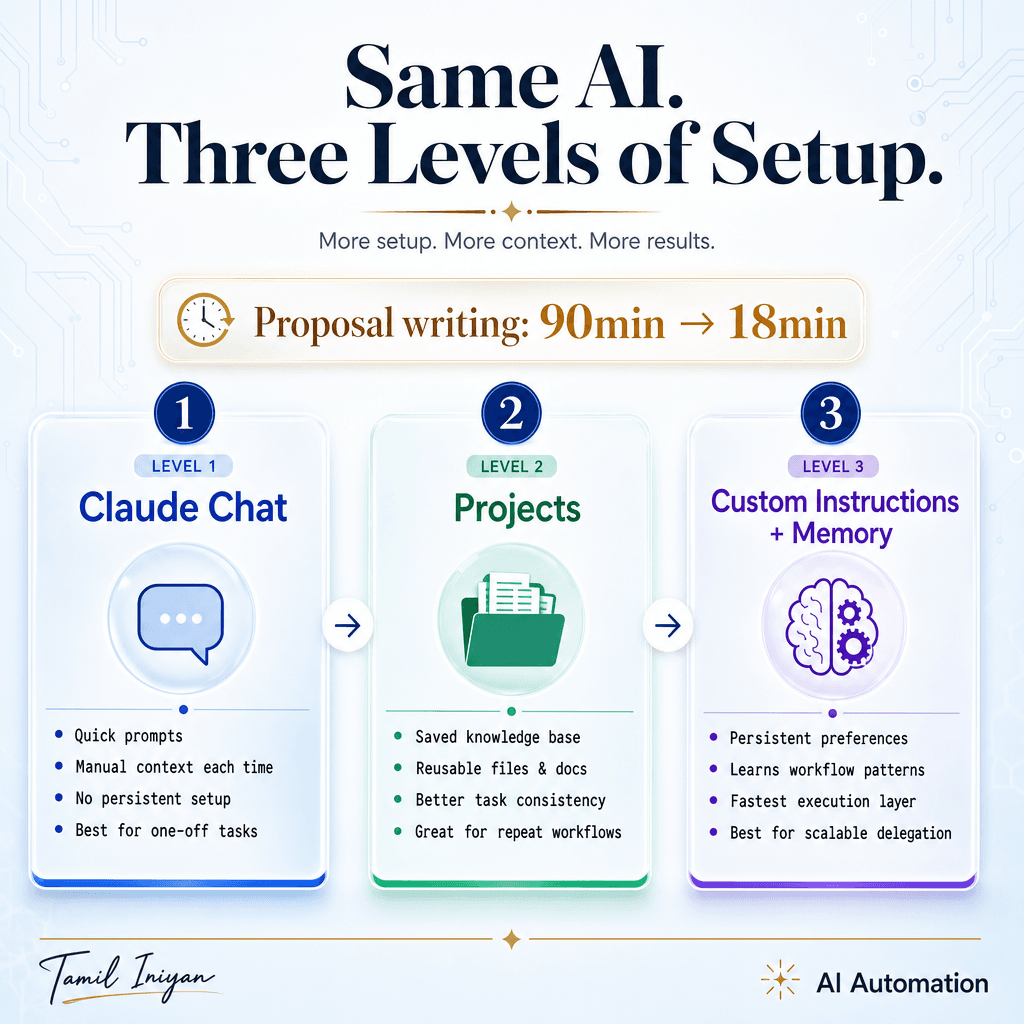
Claude Chat vs Project vs Skills: How to Set Up AI That Actually Remembers
TL;DR: Using Claude in one blank chat with zero context is why your outputs feel generic. Projects give Claude persistent memory of your business. Skills turn recurring tasks into reusable workflows. Same AI, three completely different results.
Most agencies open Claude, type a prompt, get an answer, and close the tab. Next day they do it again. And again. Re-explaining the business, the tone, the client every single time.
This is not a Claude problem. This is a setup problem.
Claude has three layers: Chat, Projects, and Skills. Chat is where most people stay stuck. Projects is where Claude starts remembering your work. Skills is where recurring tasks become reusable workflows that run without re-prompting.
Same AI. Different setup. Completely different outputs.
Level 1: Chat (Where Most People Are Stuck)
You open Claude. You type a prompt. It answers. Next day it forgot everything.
This is fine for one-off questions. It is terrible for recurring work.
Every time you need a client proposal, you re-paste the service breakdown. Every time you need an email sequence, you re-explain the tone. Every time you need a brief summary, you re-upload the context.
You are spending more time feeding Claude information than Claude is spending writing for you.
By 2025, 84% of developers use AI tools daily and 41% of new code is AI-generated. But the teams seeing real results are not using AI in one-off chats. They are embedding AI into workflows with persistent context. Engineering orgs using Claude with structured setups report 25 hours saved per complex refactor per developer and 60% fewer deployment failures when Claude is wired into orchestrated workflows instead of blank chats.
The same principle applies to agency work. If you are re-explaining your business every time you open Claude, you are using a 2026 tool with a 2023 mindset.
Level 2: Projects (Where You Should Be)
Create a Project. Upload 3 to 5 key documents:
- Your service breakdown
- 2 to 3 past client proposals
- Your brand voice doc
- Sample emails you have sent
Now Claude remembers. Every chat inside that Project has context. No more re-explaining.
Here is what changes:
You ask for a proposal. Claude already knows your offer structure, your pricing tiers, and your tone. It writes a first draft that sounds like something you would actually send.
You ask for a client brief summary. Claude already knows your clients, your deliverables, and your formatting rules. It pulls the relevant details without you pasting the entire project scope again.
You ask for an email sequence. Claude already knows your voice, your ICP, and your constraints. The output does not sound like a generic AI assistant. It sounds like you.
This is the difference between generic outputs and agency-ready outputs. Projects give Claude the context it needs to produce work that does not require 10 rounds of editing.
AI code automation teams using this approach see 40% reduction in review time and 62% fewer production bugs. Not because the AI got smarter. Because the setup got better.
The same logic applies to content, reporting, and ops workflows. One Project per client or function. Feed it the documents Claude needs to remember. Stop re-pasting context daily.
Level 3: Custom Instructions and Memory (Where It Gets Dangerous)
Go to Settings. Turn on Memory. Add Custom Instructions.
Custom Instructions tell Claude:
- Your ICP (who you serve)
- Your offer (what you build)
- Your constraints (word limits, tone rules, what to never say)
Memory means Claude learns as you work. It remembers your clients, your workflows, your preferences.
Here is the shift:
You no longer need to tell Claude to avoid certain phrases. You told it once in Custom Instructions. It remembers.
You no longer need to paste your offer structure every time you write a proposal. Claude knows it.
You no longer need to explain your tone rules every time you draft an email. Claude learned your voice from the last 30 emails you wrote together.
I switched from Level 1 to Level 3 two months ago. Proposal writing went from 90 minutes to 18 minutes. Client brief summaries went from manual to one-click. Email sequences went from stiff templates to sounding exactly like me.
Same AI. Different setup.
Skills: The Next Layer
Skills are reusable workflows. Think of them as saved agents that run specific tasks.
Instead of prompting Claude to write an ad set every time, you create an Ad Set Builder Skill. You wire it to the right Project. You define the inputs (offer, audience, platform). You define the outputs (3 headline variations, 2 body copy options, CTA).
Now you run the Skill. Claude pulls the context from the Project. It follows the workflow. It delivers the output in the exact format you need.
This is the difference between using Claude as a chatbot and using Claude as a system.
The AI agent market is forecast to grow from $8B in 2025 to $50B by 2030. That growth is not coming from people typing better prompts into blank chats. It is coming from agentic setups where AI runs recurring workflows with persistent context.
Analysts predict 25% of enterprises using AI will deploy agentic pilots in 2025, rising to 50% by 2027. These are not one-off experiments. These are production workflows where AI remembers the inputs, follows the process, and delivers the outputs without daily re-prompting.
If you are still using Claude in one blank chat, you are missing this entire layer.
Common Mistakes
Treating Claude as a single blank Chat instead of configuring Projects with your agency profile, client roster, offers, tone rules, and formatting constraints.
Not defining Skills for recurring tasks. Briefs, ads, reports, SOPs. If you are writing the same type of thing more than twice a week, it should be a Skill.
Mixing unrelated topics in one Project. If you put all your clients in one Project, Claude's memory gets noisy. One Project per client or function. Keep the context tight.
No versioning. Teams change instructions on the fly instead of maintaining a living project brief. If your Custom Instructions are not documented somewhere, they will drift. Document the setup. Update it when your process changes.
How to Actually Set This Up
Start with one Project. Pick your most frequent client or your most recurring task.
Upload 3 to 5 documents:
- Service breakdown or offer doc
- 2 to 3 past proposals or deliverables
- Brand voice guidelines
- Sample outputs (emails, briefs, whatever you write most often)
Turn on Memory in Settings. Add Custom Instructions:
- Who you serve (ICP)
- What you build (offer)
- How you write (tone rules, constraints, banned phrases)
Use the Project for one week. Every time you ask Claude to do something, do it inside the Project. Not in a blank chat.
Watch what changes. Watch how much less time you spend re-explaining context. Watch how much closer the first draft is to what you would actually send.
After one week, create a Skill for your most recurring task. Ad sets, client briefs, email sequences, whatever you do most often. Define the inputs, define the outputs, wire it to the Project.
Now you have a system. Claude remembers your work. Claude follows your process. Claude produces outputs that sound like you.
How Flownix Labs Can Help
We build done-for-you lead generation, enrichment, and nurturing systems for marketing agencies. But the same principle applies to how we use AI internally.
Every client has a Project. Every recurring workflow has a Skill. We do not re-paste context daily. We do not spend 90 minutes on proposals that should take 18 minutes.
If your agency is still using Claude in one blank chat, you are losing hours every week to re-explaining the same context over and over. We can help you set up Projects and Skills so Claude remembers your work, follows your process, and produces agency-ready outputs without daily re-prompting.
The setup takes one afternoon. The time savings compound every single week after that.
Visit flownixlabs.com to see how we build systems that run without anyone touching them.
Share this article
Spread the knowledge with your network.
ENTERPRISE SOLUTIONS