
I Replaced 20 Apps With One Chat Window (Here's How)
TL;DR: Most agencies pay $400 to $600 monthly across 15+ tools and lose 2.1 hours daily switching between them. Claude Desktop connectors let you run your entire stack from one interface. I connected 20 tools in 20 minutes. What took my team 12 hours weekly now takes 90 minutes.
The $600 Monthly Tool Tax Nobody Talks About
Your agency is probably paying for Google Workspace, Notion, HubSpot, Apollo, Canva, Zapier, Slack and Asana. That is $400 to $600 per month before you add the niche tools.
The cost is not just the subscriptions. Workers lose 2.1 hours daily to app switching according to Asana's 2025 Anatomy of Work Index. That is 9.3 hours per week. For a 5 person team, that is $25,000 per year in lost productivity per employee.
65% of SaaS decision makers report tool sprawl as their top pain point. The average firm juggles 17 apps per workflow according to MuleSoft's 2024 Connectivity Benchmark. Every workflow requires opening 8 different tabs, copying data between them, and praying nothing breaks in the handoff.
This is not a productivity problem. It is an architecture problem. Your tools do not talk to each other so you become the integration layer.
What Changed
Claude Desktop launched connectors in early 2026. Not another integration platform. Not another workflow builder. A way to give Claude direct access to your tools so it can execute tasks across your entire stack without you opening a single tab.
I connected 20 tools in under 20 minutes. Here is what that looks like in practice.
Before connectors: Open Apollo, pull 50 leads matching ICP criteria, export CSV, upload to Clay for enrichment, wait for enrichment to finish, export enriched data, import to HubSpot, manually draft emails in Gmail, schedule follow ups in Google Calendar, update project tracker in Notion.
8 tools. 45 minutes. Every single day.
After connectors: "Claude, find 50 leads matching this ICP, enrich them through Clay, add to HubSpot, draft personalised emails and schedule follow ups for next week."
One prompt. 3 minutes. Done.
The bottleneck is not the tools anymore. It is whether you have connected them to one interface.
The Connector Setup That Replaced My Entire Stack
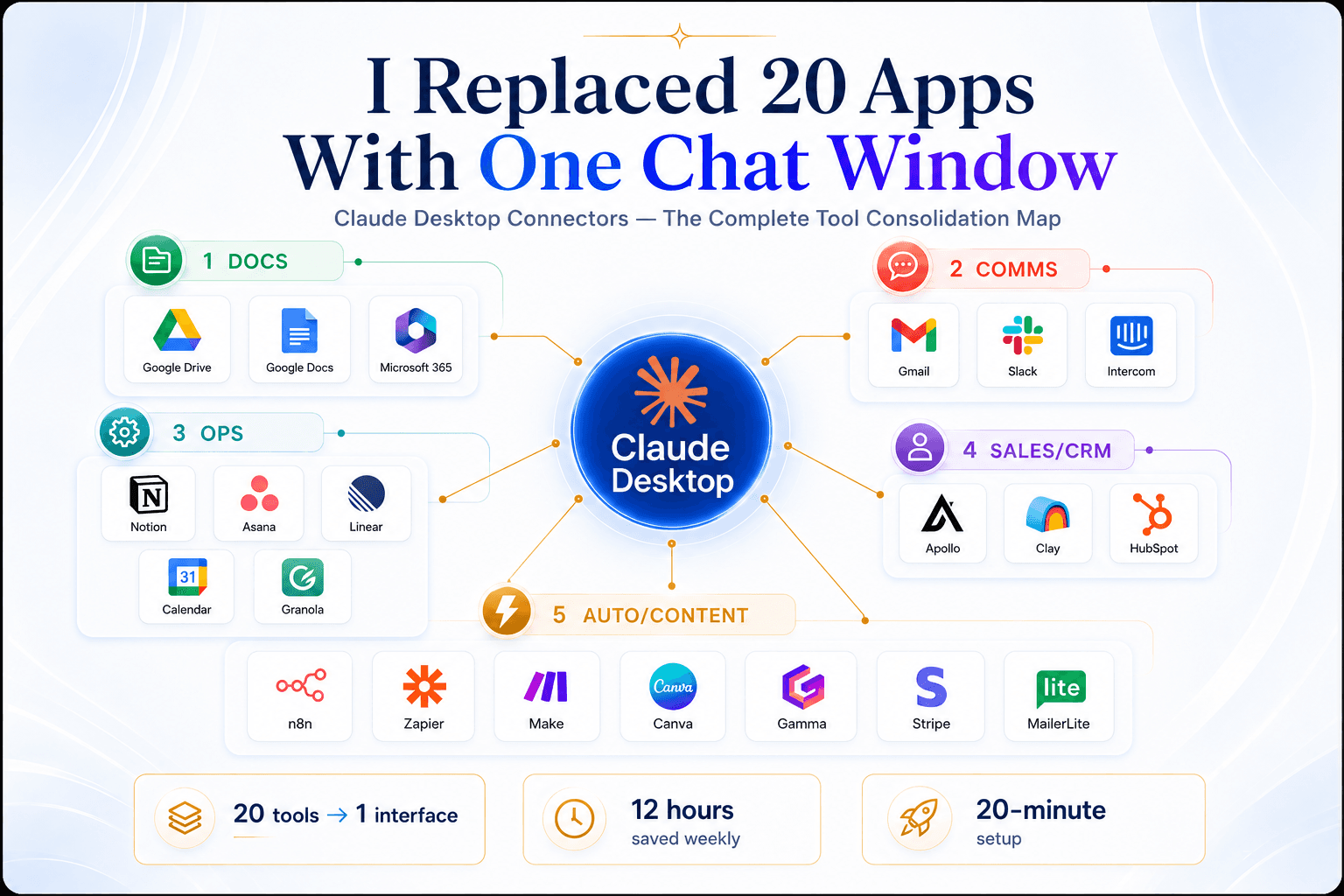
Claude Desktop supports 20+ connectors as of May 2026. Here is what I connected and what each one eliminated.
Google Drive + Docs + Calendar Claude reads your files, schedules meetings, manages your calendar without you uploading anything. No more downloading a doc to reference it in a conversation. No more copy pasting meeting links. Claude surfaces the context it needs directly from your Drive and updates your calendar based on the conversation.
Gmail + Slack Claude searches your inbox, drafts replies, pulls Slack threads mid conversation. I used to open Gmail, scan for urgent threads, switch to Slack to check if anyone mentioned me, then go back to Gmail to respond. Now I ask Claude to surface the 5 most urgent threads from the past 24 hours and draft replies for each. It pulls Slack context if needed without me asking.
Notion + Asana + Linear Claude updates your project tracker, creates tasks, coordinates goals across the team. I stopped manually creating Asana tasks after client calls. I tell Claude what we committed to and it creates the tasks, assigns them to the right people, and updates the Notion project brief.
Apollo + Clay + HubSpot Claude finds prospects, researches accounts, updates your CRM, drafts follow ups. This is where the time savings hit hardest. Lead generation used to be a 4 tool process. Now it is one sentence to Claude. It pulls leads from Apollo, enriches through Clay, pushes to HubSpot and drafts outreach emails. The only manual step left is reviewing the emails before they send.
Canva + Gamma Claude designs carousels, presentations, landing pages from a prompt. Zero manual design. I used to open Canva, pick a template, drag elements around, export, upload to LinkedIn. Now I describe what I want and Claude builds it in Canva or Gamma depending on format. I review and publish.
n8n + Zapier + Make Claude runs your automation workflows directly from the chat. I have 12 n8n workflows handling client onboarding, lead nurture sequences, and reporting. Before connectors, I had to open n8n to trigger them manually or set up webhook listeners. Now Claude triggers them mid conversation when context requires it.
The setup takes 20 minutes total. Claude Desktop, Settings, Connectors, Browse connectors. Add the tools you already use. Grant access once. Talk to Claude like you are delegating to a VA who has access to everything.
What This Actually Looks Like In Production
I have been running this setup for 6 days as of writing this. Here is what changed.
Weekly reporting used to take my team 4 hours. Pull data from HubSpot, Google Ads, Meta Ads Manager. Build charts in Google Sheets. Format the deck in Canva. Export to PDF. Email to clients.
Now: "Claude, pull last week's performance data from HubSpot, Google Ads and Meta. Create a summary deck in Gamma with charts comparing to prior week. Export as PDF and draft client email with key takeaways."
Elapsed time: 8 minutes. Human involvement: reviewing the deck and editing the email subject line.
Client onboarding used to require 7 manual steps across Notion, HubSpot, Google Calendar and Slack. Create client record in HubSpot. Add project in Notion. Schedule kickoff call. Create Slack channel. Invite team. Send welcome email with meeting link. Update CRM status.
Now: "Claude, onboard new client ABC Corp. Create HubSpot record, Notion project, kickoff call for Thursday 2pm, Slack channel with Sarah and Mike, send welcome email."
Claude executes all 7 steps. I review the calendar invite and the email before they send. Everything else happens automatically.
Lead generation runs on autopilot now. I give Claude the ICP criteria once. It pulls 50 leads daily from Apollo, enriches through Clay, adds to HubSpot, drafts personalised cold emails based on recent company news or hiring signals. I review the batch every morning and approve sends. What used to take 90 minutes daily now takes 15.
The Mistakes I Made So You Do Not Have To
Mistake 1: Connecting Everything At Once
I tried connecting all 20 tools on day one. Claude could not keep context across that many integrations. I overwhelmed it with access and got generic responses.
Start with 5 core tools. Get comfortable with how Claude uses them. Add more once the first batch feels automatic.
Mistake 2: Not Setting Permission Boundaries
I gave Claude full write access to everything immediately. It created a task in the wrong Asana project because I was not specific enough in my prompt. The task ended up in a client facing board before I caught it.
Start with read only access. Let Claude surface information first. Grant write permissions tool by tool as you learn where it needs them.
Mistake 3: Assuming It Knows Your Workflow
Claude is smart but it does not know your internal processes. I asked it to onboard a client and it skipped creating the Slack channel because I did not mention it in the prompt.
Document your standard workflows once. Reference them in prompts until Claude learns the pattern. After 3 or 4 times, it will predict the full workflow from a partial prompt.
Mistake 4: No Human Review Layer
I let Claude send a client email without reviewing it first. The tone was slightly off. Not wrong, just not how I would have written it.
Set up approval gates for anything client facing. Claude drafts. You review. You send. This is not about trust. It is about maintaining voice and catching edge cases the model misses.
The Tools Dying Fastest
Some categories collapsed immediately after I added Claude connectors.
Screenshot and annotation tools: I was paying $12 monthly for CleanShot X to capture screens and add arrows. Claude now does this through Canva connector. I describe what I want annotated and it builds it.
Scheduling tools: Calendly was $10 monthly. Claude handles scheduling through Google Calendar connector. It checks availability, sends invites, manages RSVPs.
Transcription services: Otter.ai was $16.99 monthly for meeting transcripts. Claude accesses Granola connector for AI meeting notes. Everything from calls gets surfaced when I need it.
Email marketing: MailerLite was $25 monthly. Claude drafts campaigns, manages lists, schedules sends through the MailerLite connector.
Design templates: I was paying Canva Pro $12.99 monthly mostly for templates. Claude builds designs from scratch through the connector. The premium templates are no longer the value prop.
These are not essential tools. They are nice to haves that became redundant once Claude could access the core platforms directly. The lesson is not to cancel every subscription. It is to audit which tools are doing work that Claude can now handle through connectors to your primary stack.
Why This Works Better Than Zapier or Make
Zapier and Make are fantastic for pre-defined workflows. Trigger happens, action executes, next step fires. They break when you need dynamic decisions mid workflow.
Example: I have a lead enrichment flow. Pull lead from Apollo, check if company has 10+ employees, if yes enrich through Clay, if no skip enrichment, add to HubSpot either way, draft email based on whether enrichment data exists.
In Zapier, this requires branching logic, filters, conditional paths. It works but changing the criteria means rebuilding part of the flow. I do this maybe twice a month as ICP evolves.
With Claude connectors, I just change the prompt. "Claude, only enrich companies with 50+ employees now." It adjusts the workflow in real time. No rebuilding. No testing conditional branches.
The other difference: natural language beats visual builders for ad hoc tasks. If I need a one time report combining HubSpot, Google Calendar and Notion data, I do not want to build a Zapier flow I will use once. I want to describe what I need and get it.
Claude connectors fill the gap between repetitive automations and one off requests that do not justify building infrastructure.
How Flownix Labs Can Help
We build done for you lead generation, enrichment and nurturing systems for marketing agencies using n8n, Apollo, Clay and Claude. If you are still running your pipeline manually or losing leads in the handoff between tools, we will build you a system that runs automatically from prospect to booked call.
The agencies we work with stop losing clients to slow follow up and cut manual work by 80%. That is worth $1,500 to $2,000 as a one time build, running in a week.
We also train your team to use Claude connectors properly so you stop paying for tools you no longer need and stop wasting time switching between the ones you keep.
Book a call at flownixlabs.com and we will walk you through exactly what we would build for your agency.
The Bottom Line
78% of businesses now use 5+ AI tools according to Gartner's 2025 AI Tool Proliferation Report. The average annual per user cost in subscriptions is $1,200. Tool sprawl is not a future problem. It is the default state for most agencies right now.
Claude Desktop connectors are not another integration platform. They are a way to collapse your entire tool stack into one interface. You stop being the integration layer. You stop losing context in handoffs. You stop paying for tools that duplicate functionality.
I replaced 20 apps with one chat window. It took 20 minutes to set up. What used to take my team 12 hours weekly now takes 90 minutes.
The bottleneck is not the tools anymore. It is whether you have connected them to one interface.
Go to Claude Desktop. Settings. Connectors. Browse connectors. Add the tools you already use. Start with 5. Add more as you get comfortable. Talk to Claude like you are delegating to a VA who has access to everything.
If you want the exact setup guide I used, visit flownixlabs.com and I will send it over.
Share this article
Spread the knowledge with your network.
ENTERPRISE SOLUTIONS